
- My system
- The problem: F13 always opens GPDTool
- Troubleshooting: is the hardware or GPDTool responsible?
- Test 1: change the hotkey in GPDTool
- Test 2: trigger F13 with an external keyboard
- Test 3: remap the rear buttons with OpenWinControls
- What could be causing this?
- Possible solutions and workarounds
- 1. Replace F13 with another key
- 2. Exit GPDTool completely
- 3. Check other hotkey programs
- 4. Try a newer version of GPDTool
- OpenWinControls as an open-source alternative for button mapping
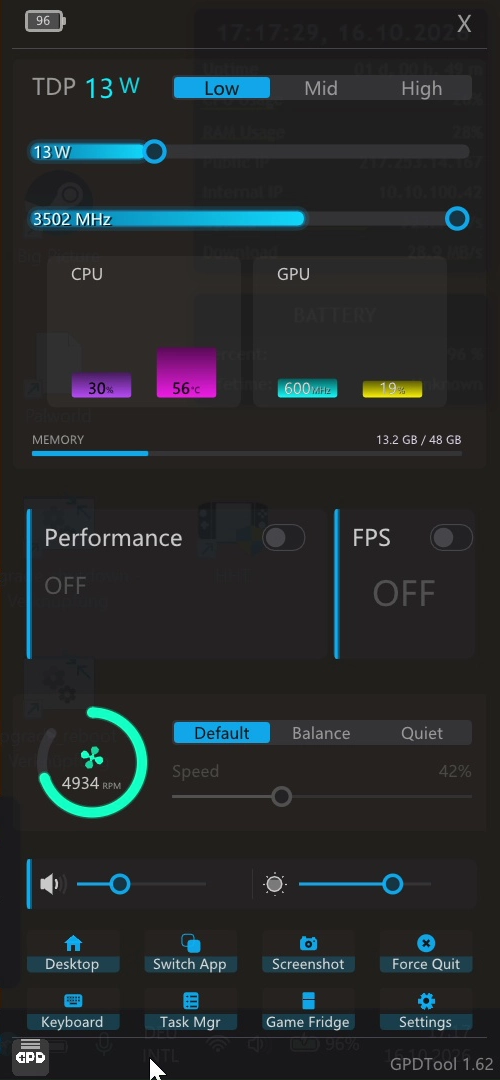
If you use a GPD handheld running Windows 11, you are probably familiar with GPDTool. Among other things, the application lets you adjust the TDP, control the fans and monitor system performance. Its overlay is particularly useful: you can open it while gaming with a keyboard shortcut of your choice.
However, I ran into an unusual problem on my GPD Win Mini 2025 with AMD Ryzen AI 9 HX 370: the GPDTool overlay opens every time I press F13, even though I have configured a completely different keyboard shortcut in the settings.
In this post, I describe the problem, the tests I have carried out so far and possible workarounds.
My system
I am using the following hardware and software to investigate the problem:
| Component | Version |
|---|---|
| Device | GPD Win Mini 2025 |
| Processor | AMD Ryzen AI 9 HX 370 |
| Operating system | Windows 11 |
| GPDTool | 1.62 |
| OpenWinControls | 2.10 |
| Controller firmware | X3.6 / K1.24 |
| Original L4 assignment | F13 |
| Original R4 assignment | F14 |
I use the open-source program OpenWinControls to configure the two rear buttons, L4 and R4.
The problem: F13 always opens GPDTool
I originally configured the two extra rear buttons as follows:
- L4: F13
- R4: F14
The function keys F13 through F24 are particularly useful for additional hotkeys, such as those for screenshots, screen recordings, macros or other actions. Since they are rarely found on standard keyboards, they are relatively unlikely to conflict with existing keyboard shortcuts.
However, I soon noticed that pressing L4 automatically opens the GPDTool overlay.
At first, I suspected that F13 might be a default hotkey in GPDTool.
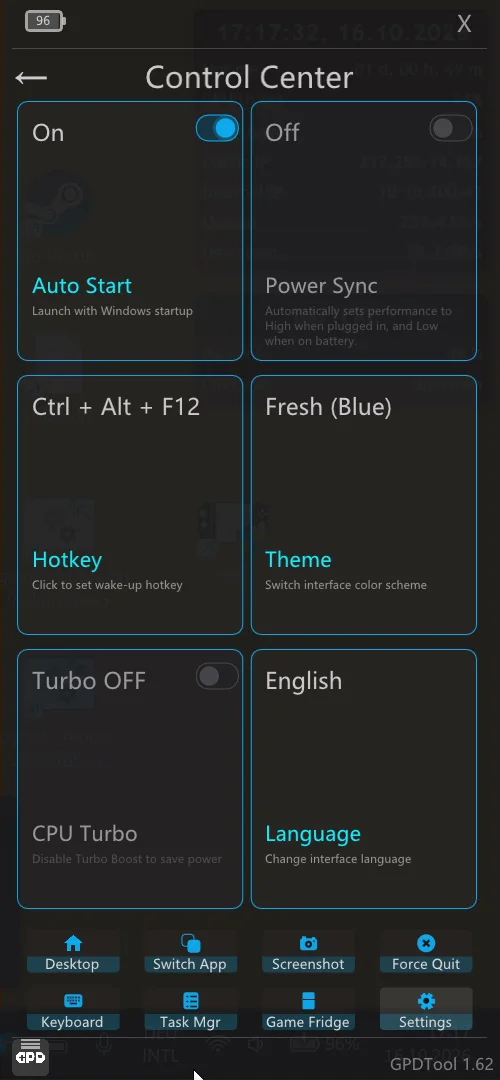
However, I had already configured a different keyboard shortcut in the settings under Control Center → Hotkey:
Ctrl + Alt + F12
Despite this change, simply pressing F13 still opens GPDTool.
Troubleshooting: is the hardware or GPDTool responsible?
I carried out several tests to narrow down the cause.
Test 1: change the hotkey in GPDTool
First, I changed the hotkey for opening the overlay to Ctrl + Alt + F12.
Result: F13 still opens the overlay. The change therefore does not prevent the unwanted behavior.
Test 2: trigger F13 with an external keyboard
Next, I triggered F13 using an external keyboard, independently of the rear buttons on the GPD Win Mini.
Result: the GPDTool overlay opens in this case as well.
This largely rules out a problem with the physical L4 button as the sole cause. There appears to be a conflict in the way the F13 keypress is processed in Windows.
Test 3: remap the rear buttons with OpenWinControls
As the next step, I changed the assignments using OpenWinControls 2.10:
- L4: F14
- R4: F15
This avoids using F13 for either rear button for now. Further testing is needed to determine whether it resolves all conflicts.
What could be causing this?
The exact technical cause is still unclear. Several explanations are possible:
- Additional hotkey: GPDTool might register F13 independently of the custom hotkey.
- Faulty hotkey management: a previous hotkey registration might remain active after the keyboard shortcut is changed.
- Software conflict: another background application might intercept F13 or trigger an additional keyboard shortcut.
These tests do not establish whether F13 is hardcoded directly into GPDTool.
What remains notable, however, is that F13 opens the overlay regardless of the keyboard used, even though the configured hotkey uses a different key combination.
Possible solutions and workarounds
Until the cause is clearly established, there are several ways to narrow down the problem or work around it temporarily.
1. Replace F13 with another key
The simplest workaround is to use a different function key instead of F13, preferably one that is not already in use.
For example, OpenWinControls can assign F14 and F15 to the rear buttons. As long as GPDTool does not also respond to those keys, they remain available for your own shortcuts.
2. Exit GPDTool completely
To help isolate the problem, try exiting GPDTool completely, including any background processes that may still be running.
You can then check whether F13 still triggers an unexpected action.
This makes it easier to determine whether GPDTool itself or another application is processing the keypress.
3. Check other hotkey programs
Programs such as AutoHotkey, macro tools and other overlay applications can register global keyboard shortcuts.
It is therefore worth temporarily disabling these applications and testing the behavior again.
4. Try a newer version of GPDTool
In addition to version 1.62, which I am using, GPDTool 1.65, dated September 18, 2026, is now available.
The newer version includes various improvements and bug fixes, for example to power management and the user interface.
However, the published release notes do not explicitly list a fix for the F13 issue described here.
I have not yet checked whether the bug still occurs in version 1.65.
Downloads and further information are available from GPD and in the DROIX Knowledge Base.
OpenWinControls as an open-source alternative for button mapping
While GPDTool’s open-source status is still unclear, OpenWinControls is already available as a public community project.
OpenWinControls is a cross-platform alternative for configuring GPD controllers. Its features include:
- Remapping controller buttons and extra buttons
- Configuring macros
- Assigning additional function keys
- Importing and exporting button profiles
- Support for various GPD handhelds
The project is available on GitHub and is licensed under GPL-3.0. It can therefore be forked and extended in accordance with the license terms.
GitHub: https://github.com/OpenWinControls/OpenWinControls
However, OpenWinControls is not a complete replacement for GPDTool. It focuses primarily on controller configuration and does not provide the full range of TDP and fan control features.


