
- What is the AYN Thor Max?
- What is GameHub?
- What is LEGO Batman: Legacy of the Dark Knight?
- Installing LEGO Batman in GameHub
- 1. Install GameHub
- 2. Open Steam in GameHub
- 3. Download LEGO Batman
- 4. Start the game
- Installing VC Redist 2022 in GameHub
- Download VC Redist 2022
- Which VC Redist version should you install?
- Installing VC Redist in the GameHub Virtual Desktop
- My GameHub settings for LEGO Batman
- CPU Translation Parameters: Extreme
- Components: d3dx11
- Launch Arguments: -dx11
- In-game graphics settings
- How well does LEGO Batman run on the AYN Thor Max?
- What is FSR?
- What is Frame Generation?
- Possible problems with LEGO Batman in GameHub
- VC Redist error
- Game does not start
- Low FPS
- Graphical glitches
- High temperature
- Frame Generation feels strange
- Comparison with the Steam Deck
- YouTube video
I tested LEGO Batman: Legacy of the Dark Knight on the AYN Thor Max using GameHub v6. The goal was to find out whether a modern PC and Steam game can run on an Android handheld in a usable way, and which settings are needed to make it as stable as possible.
I was able to install the game normally through Steam inside GameHub. To make LEGO Batman start properly, I also had to install Microsoft Visual C++ Redistributable 2022 once inside the GameHub container, using the Virtual Desktop. After that, the game launched and was playable with adjusted settings.
My short verdict: LEGO Batman runs on the AYN Thor Max with GameHub, but it is not perfect. With low graphics settings, -dx11, FSR and optional Frame Generation, the result is playable. However, you should expect FPS drops, occasional graphical glitches, FSR artifacts and higher temperatures.
What is the AYN Thor Max?
The AYN Thor Max is a dual-screen Android gaming handheld with a clamshell design. It combines Android, powerful ARM hardware and classic gaming controls in a compact device.
For my test I used the AYN Thor Max in Clear Purple. The device is powered by the Snapdragon 8 Gen 2 and has 16 GB RAM. This makes it interesting for Android gaming, emulation and tools like GameHub, because the Snapdragon 8 Gen 2 offers strong CPU performance, a capable Adreno GPU and good compatibility with modern Android graphics drivers.
Still, it is important to keep expectations realistic. An Android handheld is not a full gaming PC. When a Windows game runs through GameHub, it is not running natively on Android. It needs translation layers, compatibility layers and adjusted drivers. That makes the setup exciting, but also more error-prone.
What is GameHub?
GameHub is an Android app that allows PC games to run on Android devices. It can launch Steam games inside a Windows-like environment or container. This makes it possible to test many PC games on Android handhelds, as long as the hardware, drivers and compatibility layers are good enough.
GameHub is especially interesting for devices like the AYN Thor Max, AYN Odin, Retroid Pocket, GPD Android devices and other Snapdragon-based Android handhelds.
You can download GameHub from Google Play or directly from the GameHub website:
GameHub on Google Play:
https://play.google.com/store/apps/details?id=com.xiaoji.egggame&pcampaignid=web_share
GameHub v6 direct download:
https://gamehub.xiaoji.com/
For this test, I used GameHub v6. This version includes new features, updated drivers and Frame Generation options.
What is LEGO Batman: Legacy of the Dark Knight?
LEGO Batman: Legacy of the Dark Knight is a new LEGO action-adventure game featuring Batman, Gotham City, Bruce Wayne and well-known DC characters. The game combines typical LEGO elements such as collectibles, humor, puzzles and accessible gameplay with a more modern presentation and larger gameplay areas.
In the tested section, I played through parts of Wayne Manor Grounds, searched for Bruce’s costume and tested early gameplay scenes, cutscenes and graphics options.
The game is available for current platforms such as PC/Steam and modern consoles. For this test, I used the Steam version through GameHub on the AYN Thor Max.
Installing LEGO Batman in GameHub
The installation was fairly straightforward. You need to own the game legally in your Steam library.
1. Install GameHub
First install GameHub on the AYN Thor Max. You can use either the Google Play Store or the direct download from the GameHub website.
Google Play Store:
https://play.google.com/store/apps/details?id=com.xiaoji.egggame&pcampaignid=web_share
GameHub direct download:
https://gamehub.xiaoji.com/
2. Open Steam in GameHub
After installing GameHub, open the Steam area and sign in with your Steam account. Your Steam library should then appear.
3. Download LEGO Batman
Select LEGO Batman: Legacy of the Dark Knight from your Steam library and install it like you would on a normal PC. Depending on your internet connection and available storage, the download may take some time.
4. Start the game
After installation, you can start the game directly from GameHub. If you get an error related to VC Redist, Visual C++ Redistributable or missing runtime components, you need to install Microsoft VC Redist 2022 manually.
Installing VC Redist 2022 in GameHub
In my case, installing Microsoft Visual C++ Redistributable 2022 was necessary to make LEGO Batman start correctly. Many modern Windows games require these runtime libraries. Normally, Steam or the game installer installs them automatically. In GameHub, however, this may fail or may need to be done manually inside the container.
Download VC Redist 2022
Download VC Redist 2022 through my advertising link:
https://ouo.io/sDg8Xy
Note: This is an advertising link. If you click it, I may receive a small commission. There are no extra costs for you.
Official Microsoft VC Redist page:t:
https://learn.microsoft.com/en-us/cpp/windows/latest-supported-vc-redist?view=msvc-170#latest-supported-redistributable-version
Which VC Redist version should you install?
Inside GameHub, I would test these versions first:
vc_redist.x64.exe- if problems remain, also install
vc_redist.x86.exe - if available or required, also test ARM64
In my test, the x64 and x86 versions were especially relevant because many PC games and launchers still expect these Windows runtime components.
Installing VC Redist in the GameHub Virtual Desktop
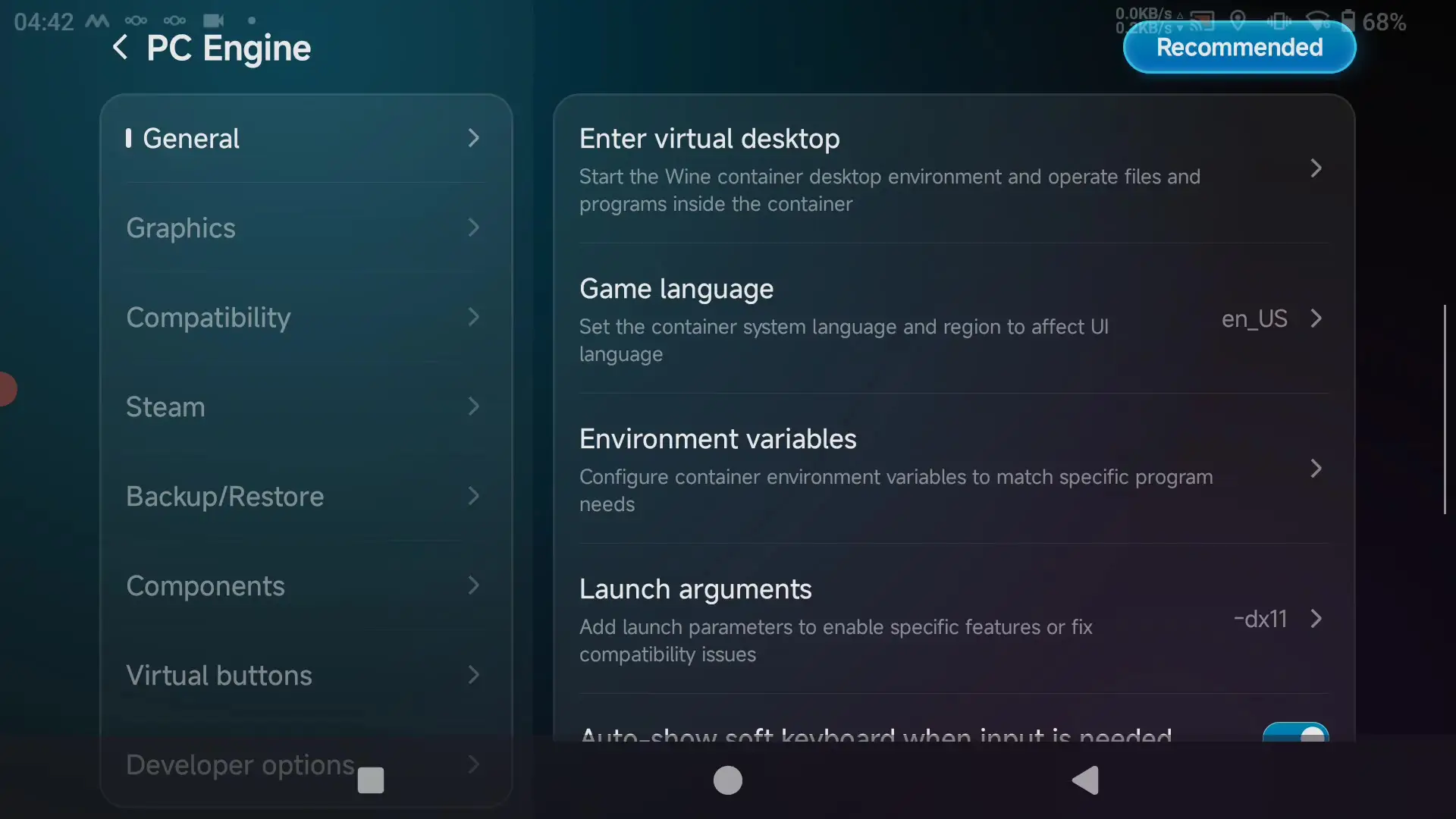
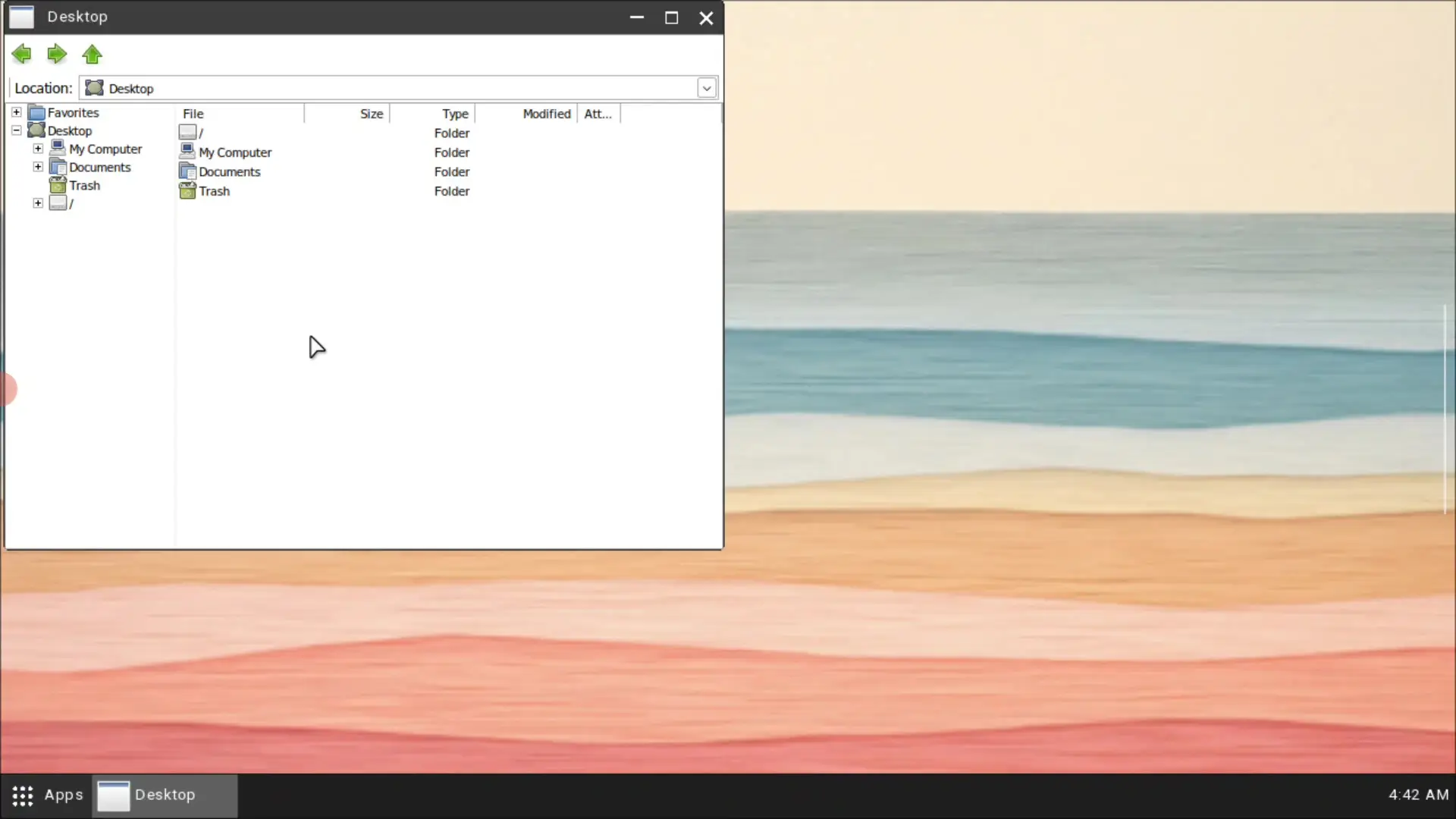
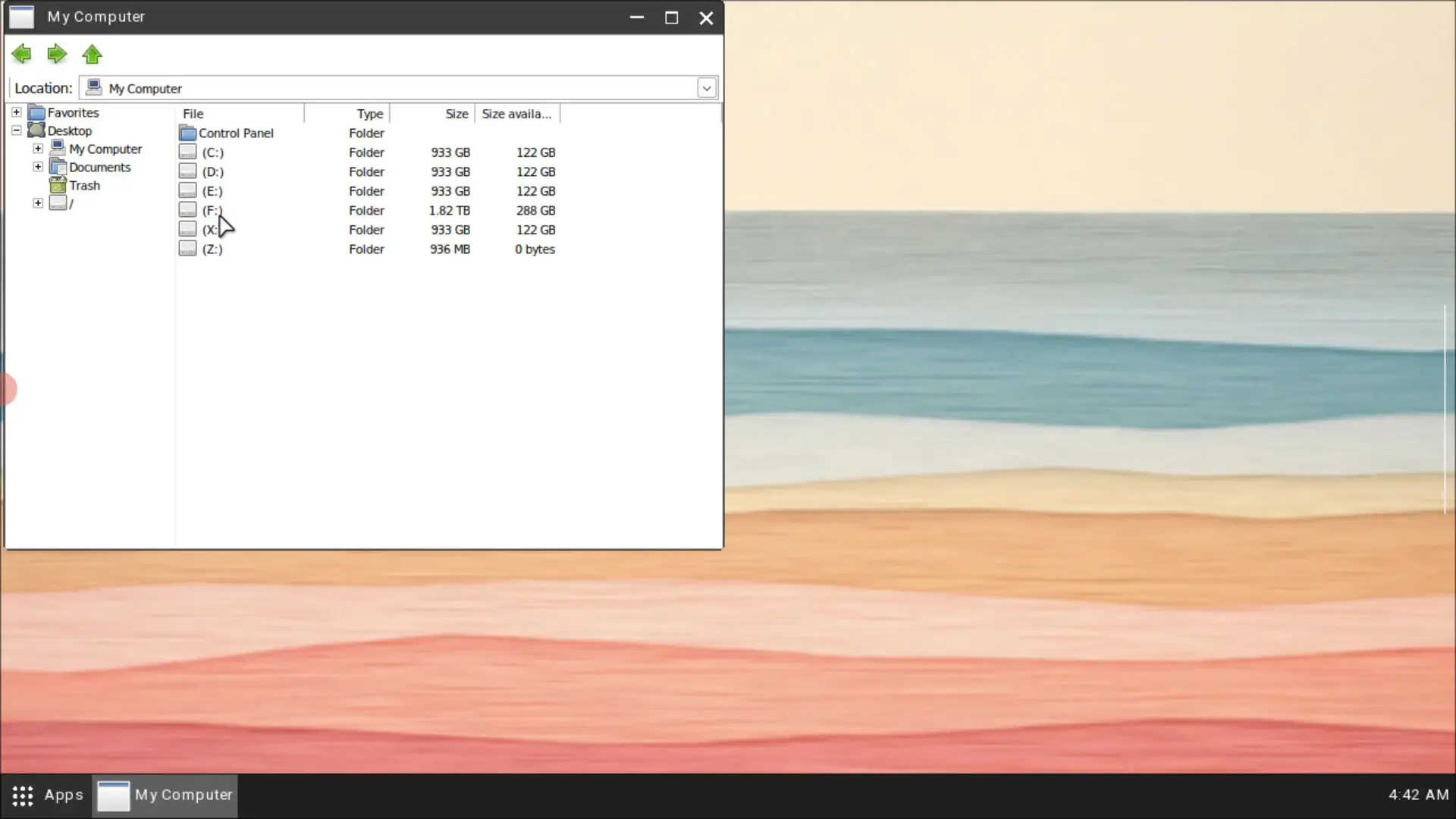
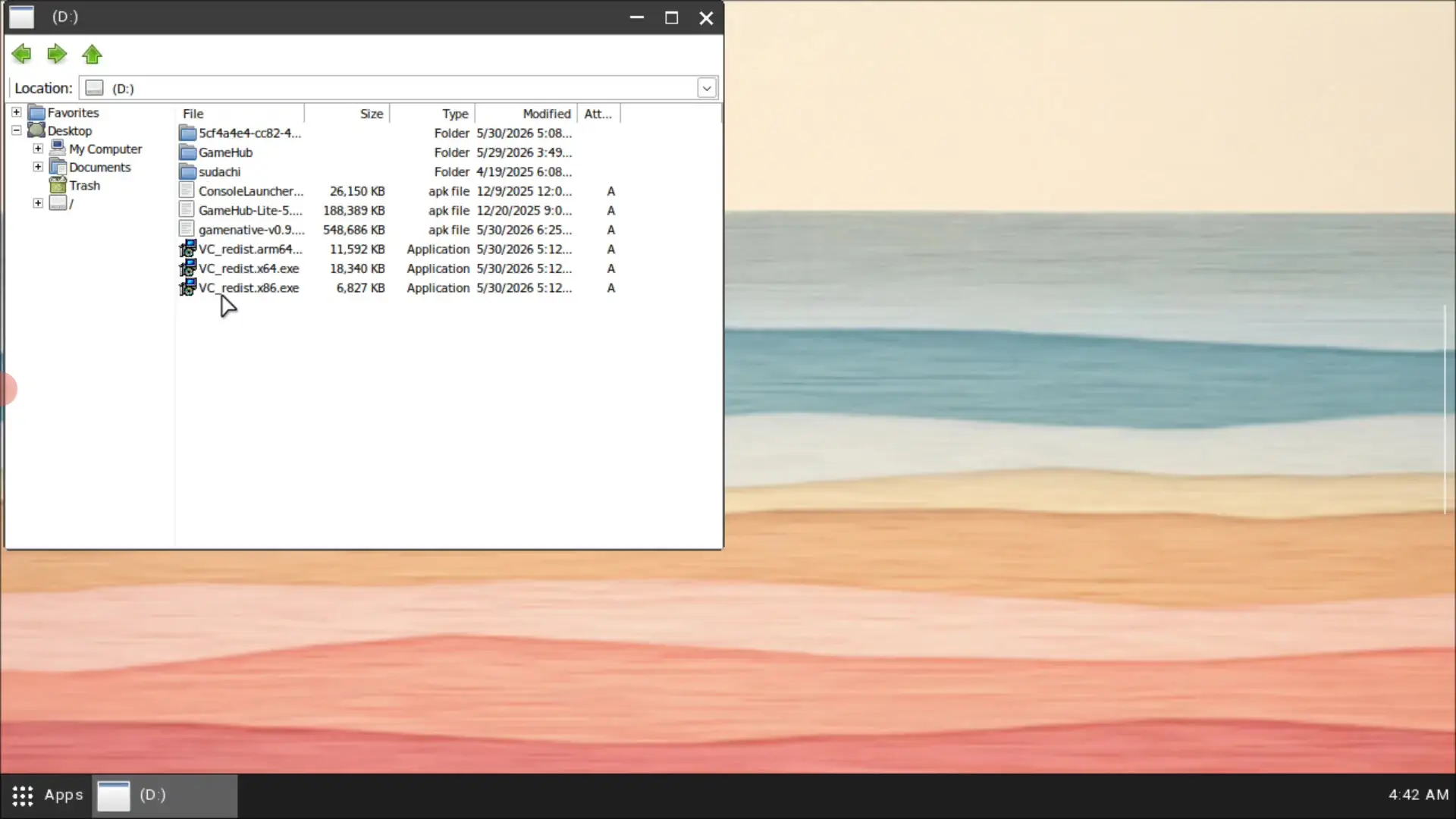
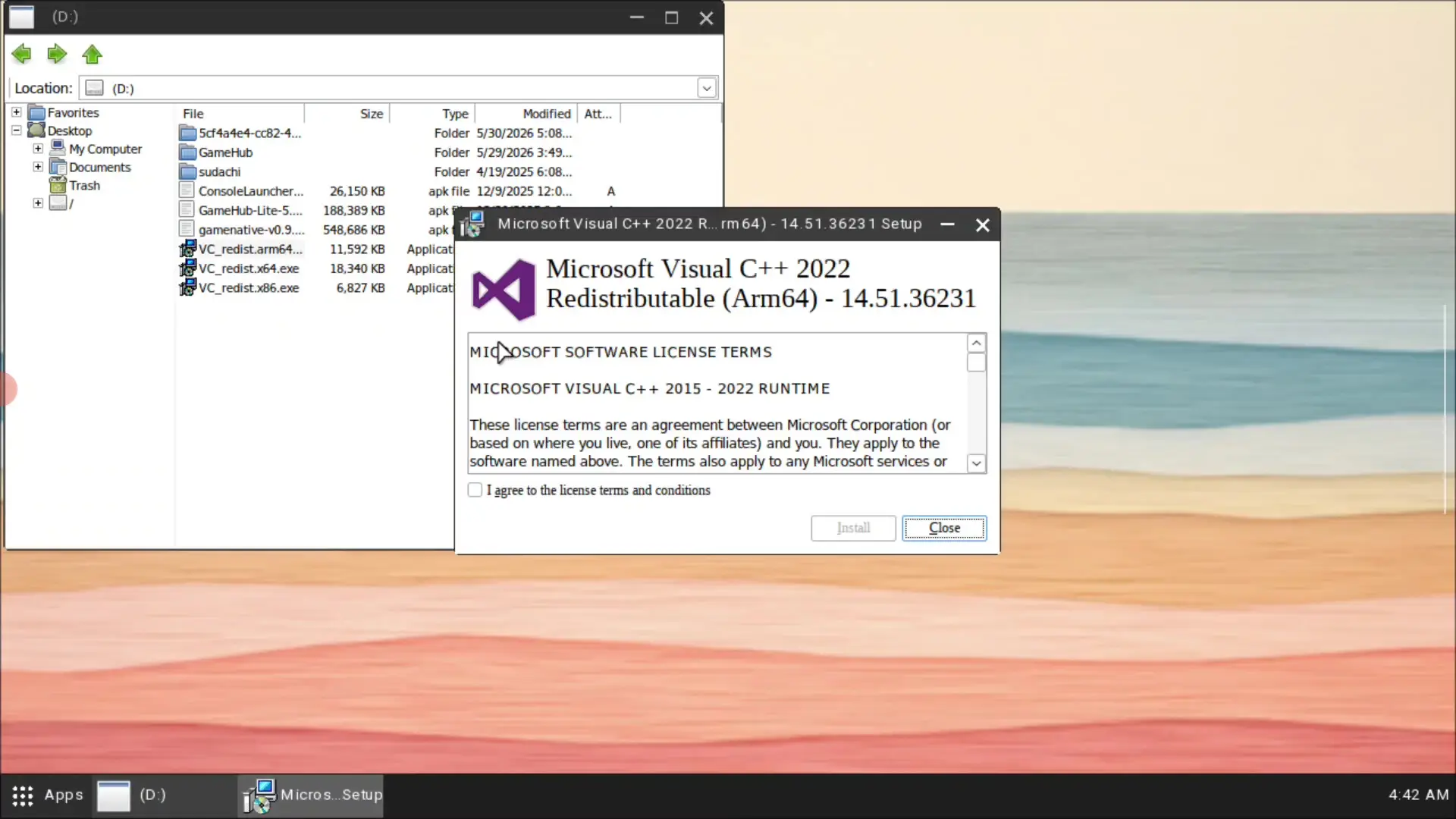
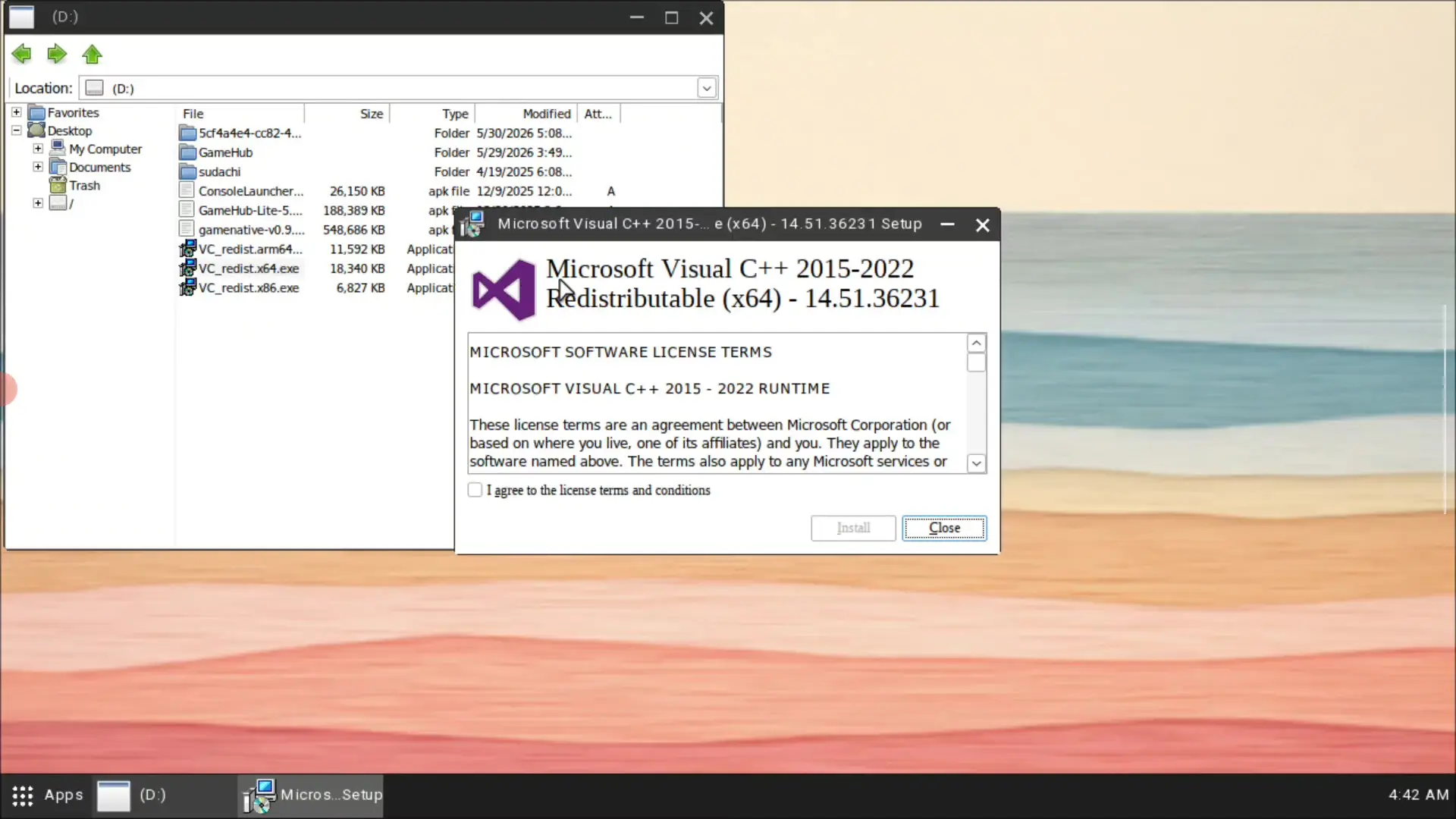
This is what I did:
- Open GameHub.
- Open the PC Engine or container settings for the game.
- Start the Virtual Desktop.
- Copy the VC Redist files to an accessible drive, for example
D:. - Run
vc_redist.x64.exe. - Accept the license terms.
- Finish the installation.
- If needed, also install
vc_redist.x86.exe. - Restart GameHub or the container.
- Start LEGO Batman again.
After installing VC Redist, the game launched properly in my setup.
My GameHub settings for LEGO Batman
To make LEGO Batman run better on the AYN Thor Max, I adjusted several settings.
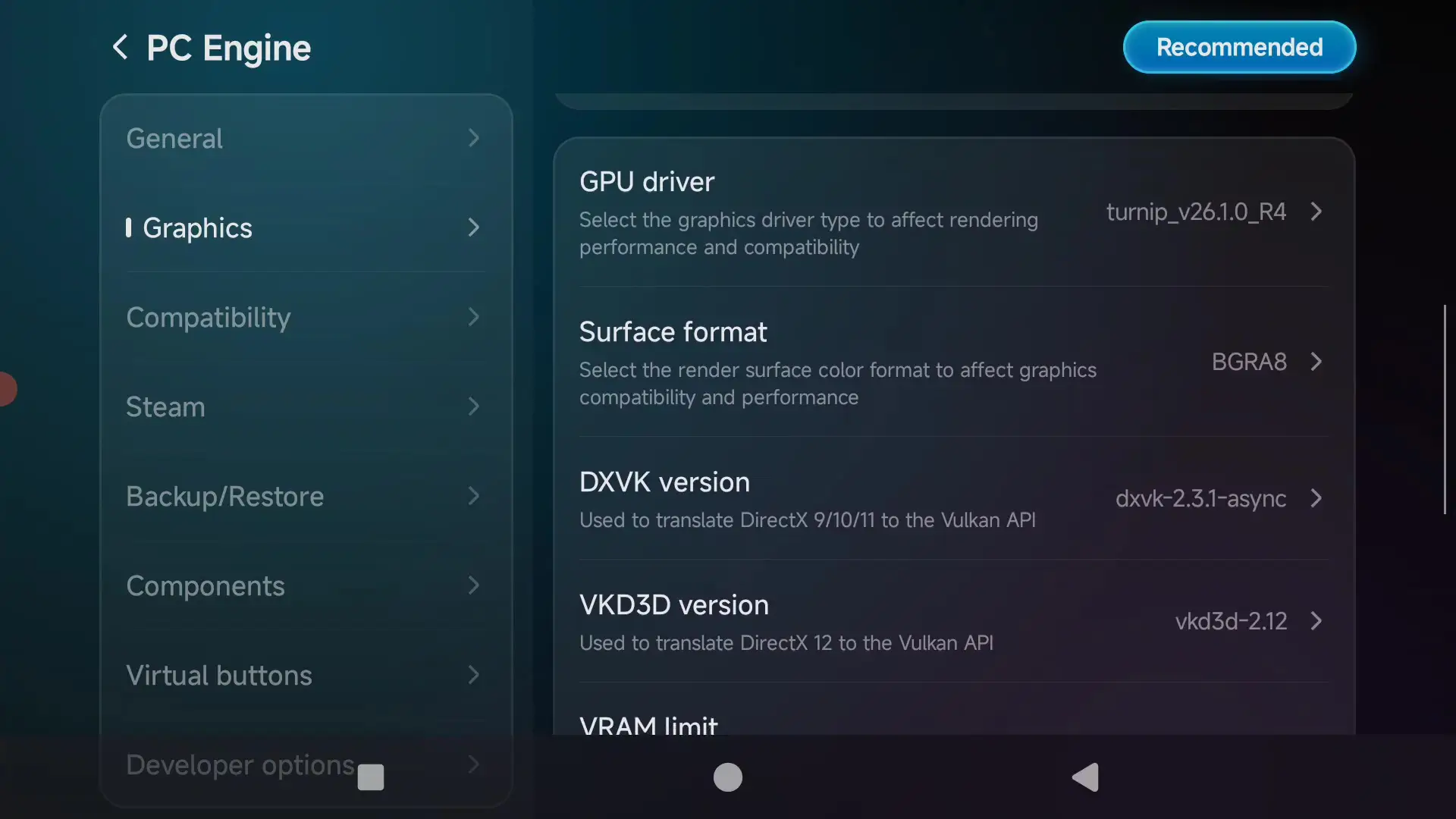
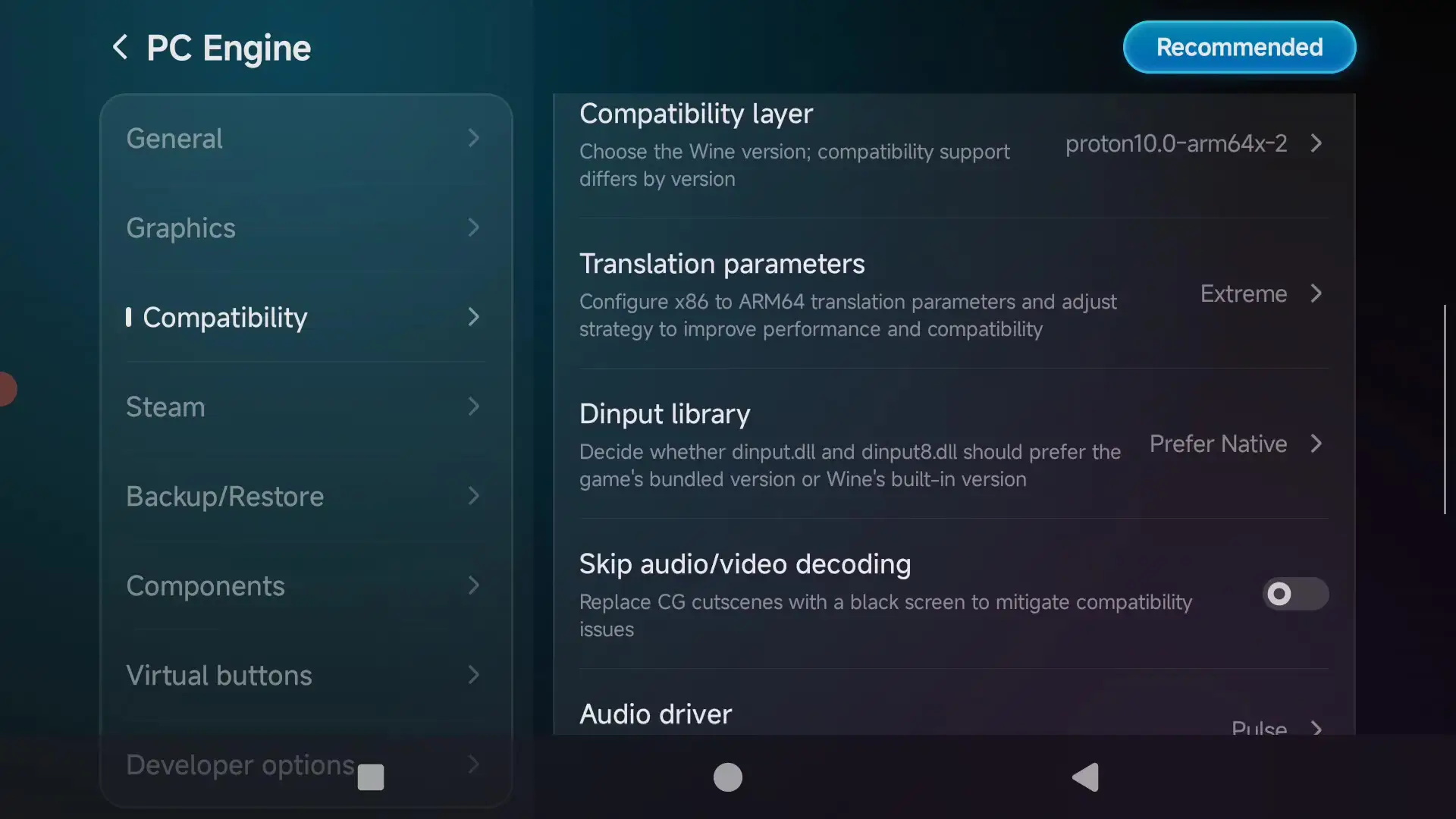
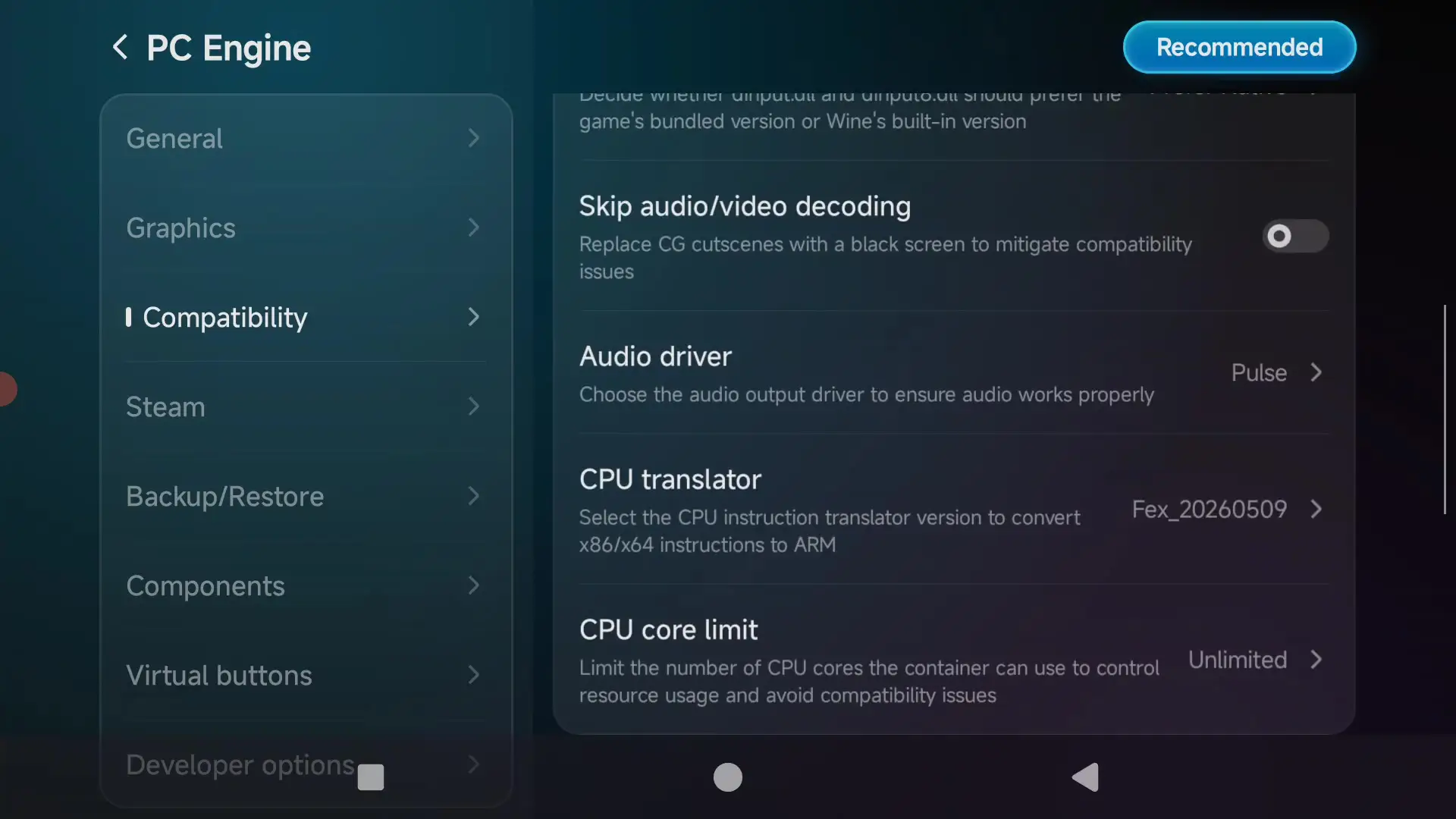
CPU Translation Parameters: Extreme
In the compatibility settings, I set CPU Translation Parameters to Extreme. This makes the x86/x64 translation more performance-focused.
This can improve performance, but it also increases CPU load, battery usage and heat. For demanding games, you should keep an eye on temperatures.
Components: d3dx11
Under Components, I used d3dx11. This is important because the game uses DirectX and GameHub has to translate the graphics calls.
Launch Arguments: -dx11
I used the following launch argument:
-dx11
This tries to start the game in DirectX 11 mode. On GameHub, this can help because DirectX 11 is often more compatible or stable than DirectX 12 in translated environments.
In-game graphics settings
Inside the game, I reduced the graphics settings. For a first test, I recommend:
- Graphics preset: Low or Custom
- Anti-Aliasing: Low
- Lighting Quality: Low
- Shadows: Low
- View Distance: Near
- Streaming Distance: Near
- Textures: Low or Medium
- Anisotropic Filtering: low
- Frame Generation: test on or off
- Resolution: 720p or lower
- alternatively 540p for more FPS
How well does LEGO Batman run on the AYN Thor Max?
In my test, LEGO Batman was playable on the AYN Thor Max. Performance depends heavily on the scene, resolution, FSR, Frame Generation and graphics settings.
At 720p with low settings and without Frame Generation, the game usually ran around 15 to 22 FPS. That is usable for a technical test, but not ideal for smooth gameplay.
At a lower resolution, around 540p or 960 × 544 pixels, with Frame Generation enabled, the game felt much smoother. Depending on the area, around 30 to 50 FPS were possible. Image quality takes a visible hit, but on the smaller screen of the AYN Thor Max it may still be acceptable depending on your expectations.
The performance overlay often showed high CPU and GPU usage. That is not unusual for a modern PC game running through GameHub on Android.
What is FSR?
FSR stands for FidelityFX Super Resolution. In simple terms, the game is rendered internally at a lower resolution and then upscaled. This can improve performance because fewer pixels have to be rendered natively.
The advantage: more FPS or lower load.
The disadvantage: the image can look softer. Fine details, edges, text, UI elements and fast movement may look less sharp or slightly unstable.
On the AYN Thor Max, FSR is useful when the game is too slow at native resolution. For LEGO Batman, FSR can help improve FPS, but you should test different modes.
What is Frame Generation?
Frame Generation creates additional intermediate frames. This can make the displayed frame rate look higher, even though not every frame is rendered normally by the game.
On a handheld like the AYN Thor Max, this can be useful if a game is just below a comfortable frame rate. In LEGO Batman, Frame Generation made gameplay look noticeably smoother in some scenes.
However, there are downsides:
- possible input latency
- ghosting
- artifacts during fast movement
- flickering or unstable image elements
- FPS counters may look higher than the native rendering performance
My recommendation: test Frame Generation, but do not leave it enabled blindly. If the game feels less responsive or artifacts become too visible, disable it or reduce the resolution instead.
Possible problems with LEGO Batman in GameHub
VC Redist error
If the game shows an error about Visual C++ or VC Redist, install VC Redist 2022 inside the GameHub Virtual Desktop.
VC Redist 2022 advertising link:
https://ouo.io/sDg8Xy
Microsoft VC Redist page:
https://learn.microsoft.com/en-us/cpp/windows/latest-supported-vc-redist?view=msvc-170#latest-supported-redistributable-version
Game does not start
Check whether VC Redist is installed. Then restart the container. If the game still does not start, test -dx11 as a launch argument.
Low FPS
Lower the resolution, use Low settings, enable FSR and test Frame Generation. 720p may be too demanding. 540p runs better, but image quality is reduced.
Graphical glitches
If you see graphical glitches, try different GameHub drivers, different d3dx11 components or lower graphics settings. Shadows, lighting, post-processing and anti-aliasing are common problem areas.
High temperature
In my test, temperatures could rise noticeably under load. This is normal when running translated PC games through GameHub. If the device gets too hot, increase the fan mode, limit FPS or reduce resolution.
Frame Generation feels strange
If motion feels unstable or artifacts are visible, disable Frame Generation or test other settings. If the native FPS is too low, Frame Generation cannot fully fix the problem.
Comparison with the Steam Deck
Compared to the Steam Deck, the AYN Thor Max with GameHub is a much more experimental setup. The Steam Deck is built for PC games and SteamOS. Many games run more comfortably there because SteamOS, drivers, shader caching and controller support are tightly integrated.
The AYN Thor Max is an Android handheld. GameHub has to make Windows games work inside an Android environment. That is technically impressive, but less predictable.
In simple terms:
- Steam Deck: better PC game compatibility
- AYN Thor Max: compact, Android-based, dual-screen, great for experiments
- GameHub: impressive, but game compatibility varies
- LEGO Batman: playable on AYN Thor Max, but likely easier and more stable on Steam Deck
If you simply want to play, the Steam Deck is often the easier choice. If you enjoy testing, tweaking and running PC games on Android, the AYN Thor Max with GameHub is a very interesting setup.
YouTube video
I also recorded a YouTube video about this test. In the video I show the GameHub settings, VC Redist 2022 installation, Steam launch, graphics settings and real gameplay with FPS, temperature, CPU and GPU overlay.


